Monday, March 21, 2011

Box Art and Some New Gameplay Variations

Kung Fu FIGHT! Box Art

Here is my first shot at box art for Kung Fu FIGHT! It still needs work, but it's getting there.

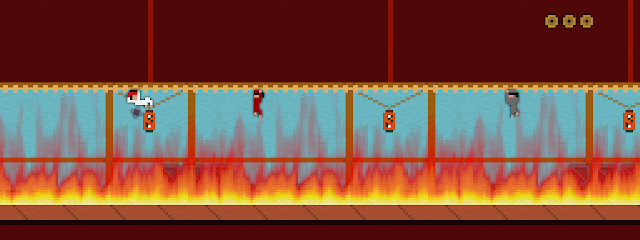
I've been working on adding more content to the game. This past week I added a couple of new gameplay variants.

Traversing the rafters in a burning section of building:

Kung Fu FIGHT!

Crate-hopping in a warehouse area:

Kung Fu FIGHT!

Wednesday, March 16, 2011

Don't Forget the Instructions

Block Village

When you are working on a game, it is easy to lose track of the knowledge you have about how your game works - knowledge that may not be obvious to other people.

When playtesting and reviewing XBLIG games, it is amazing how often I find myself in a situation where I am confused about what to do, or miss an important aspect of gameplay. I've also certainly been guilty of putting others in the same situation with my games, but I'm trying to be better about that.

Here are a few thoughts on the subject of game instructions:
  • You need instructions! It doesn't matter how simple you think your game is, you need to explicitly tell people how to play otherwise you will lose some of them. A confused player probably won't buy your game.
  • Don't assume people will read them. Just because you have instructions squirreled away in your options menu doesn't mean that people will read them. Instructions are boring - people will skip them. Providing gameplay information in the context of the actual gameplay itself is the best way to ensure the player will actually see it. In Kung Fu FIGHT!, I display in-game control hints in the early stages and I also display gameplay tips when the player dies.
  • Keep it simple. The best way to get people to read your instructions is to keep things concise and straightforward. Ten pages chock full of instructions will put people off. If your game really is that complicated, try to introduce concepts gradually and explain them when they become relevant.
  • Playtest makes perfect. As the person who knows everything there is to know about your game, you are the absolute worst person to judge which aspects of gameplay are obvious and which are not - you need to have other people play it. Kung Fu FIGHT! has been a clear example of this for me. People testing the game got frustrated because they didn't understand that certain actions were possible. The game difficulty level is plenty hard enough without confusion adding to it. Playtest feedback has allowed me to identify confusing situations and ensure that the player gets the information they need.
You really need to give your game instructions the attention they deserve. While it isn't the most sexy or fun aspect of game design, it is too much important to overlook.

    Thursday, March 10, 2011

    Splash Screens and a New Trailer


    Games have to have splash screens, so I've been working on that a bit lately. Here they are in a new Kung Fu FIGHT! gameplay trailer.

    While still not perfect (30fps is less than ideal), I've been able to coax much better video quality out of youtube. The key is to downsample to 30fps (29.97 to be precise) before uploading and using a downsampling method that blends the frames. The result is a bit blurry, but that is no where near as annoying a choppiness.

    Wednesday, March 2, 2011

    Playable Credits and a Boss Battle

    Playable Credits

    Kung Fu FIGHT! is shaping up nicely. I've tightened up the gameplay to reduce repetition, eliminated unfair death scenarios, increased the number of trophies to seven and added a boss battle.

    I've also added in playable credits. I always credit playtesters in my games, so give me some feedback to get your name in there.

    Kung Fu FIGHT! Windows Playtest Build

    Kung Fu FIGHT! Playtest on XBLIG App Hub

    Saturday, February 26, 2011

    Kung Fu FIGHT! Windows Playtest Build

    Block Village

    You can download the Kung Fu FIGHT! playtest build here:

    Kung Fu FIGHT! Windows Playtest


    I think it should run pretty much anywhere. You just need .NET 2.0 (which comes with both Vista and Windows 7) and OpenGL drivers (which most systems should have). If for some reason you don't have .NET 2.0, you can get it here.

    Any feedback is most welcome - give it a try, and let me know what you think.

    Wednesday, February 23, 2011

    Disabling Aero From Within a .NET Application Using DwmEnableComposition

    First off, why would you want to disable the Aero theme? Well, it turns out that it messes with vsync and can screw up the framerate of some applications. DirectX apps seem to be ok, but, in my experience at least, it really messes with OpenGL.

    To disable it from within a .NET application you need to DllImport dwmapi.dll. To do this you need to reference System.Runtime.InteropServices:

    using System.Runtime.InteropServices;
    

    Within one of your classes - usually where you have the application entry point - you need the following:

    [DllImport("dwmapi.dll", PreserveSig = true)]
    public static extern int DwmEnableComposition(bool enable);
    

    To invoke the method, simply do this:

    DwmEnableComposition(false);

    Friday, February 4, 2011

    Kung Fu FIGHT! Gameplay Video


    Here is some footage of the current gameplay in Kung Fu FIGHT! As usual, the youtube video is choppy - I think the fact that they downsample to 30fps is the main problem.

    I'm hoping to get a build into playtest on XBLIG this weekend.