Showing posts with label HLSL. Show all posts

Tuesday, August 30, 2011

Using shaders to create an old CRT TV screen effect

Crappy TV Effect

I've been playing around with adding an effect to make Block Zombies look like it is playing on an old, crappy TV. It still needs tweaking, but it is starting to get close to what I want.

Using a couple of screen-space shaders, I'm blurring, adding scanlines, desaturating and adding darkened corners.

I'm not planning on using this effect in-game, but I'm thinking that the intro will be some sort of news-ticker with footage of the scene of the zombie outbreak.

Tuesday, August 3, 2010

Trees Using Model Instancing

Tress Using Model Instancing

I'm working on getting more detail into my islands, so adding trees was an obvious next step. To draw them efficiently, I'm using model instancing - a technique that allows you to render multiple instances of the same geometry in a single draw call.

Thursday, July 29, 2010

Terrain Level-Of-Detail: Dealing with Seams

Terrain Rendering

Handling Level-Of-Detail (LOD) gracefully for terrain turns out to be tougher than you might expect. Terrain has a particular characteristic that you don't usually have to deal with when doing LOD for other kinds of objects (ie: trees, etc.) - it is continuous. That creates problems.

Initially, I was doing LOD on an entire island-by-island basis. I could increase or decrease the detail of the island based on distance, but the entire island had the same level of detail. That worked ok, but it was inefficient and I knew I would eventually outgrow it.

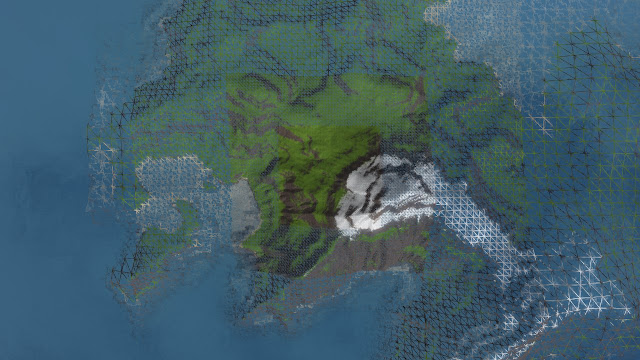
Above, you can see my current method for doing terrain LOD. Instead of the terrain being composed of a single grid mesh, it is now broken down into concentric square "rings". With each successive ring, the grid size is doubled. As the camera moves, the grid moves with it so that the highly detailed area is always nearby.

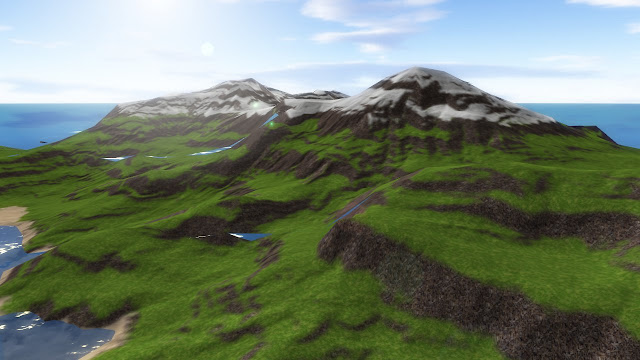
The big win you get from doing this is that the number of triangles you need to draw increases linearly with the size of the terrain, rather than exponentially with the area. The down side is that you have to deal with seams. Where one level of detail meets the next, you get discontinuities in the terrain. As you can see below, this is clearly not acceptable:
Terrain Rendering

It took me a while before I came up with a solution to the seam problem that I was happy with. Most techniques for handling seams revolve around adding extra geometry to "stitch" the edges together. I really didn't want to resort to that unless I had to.

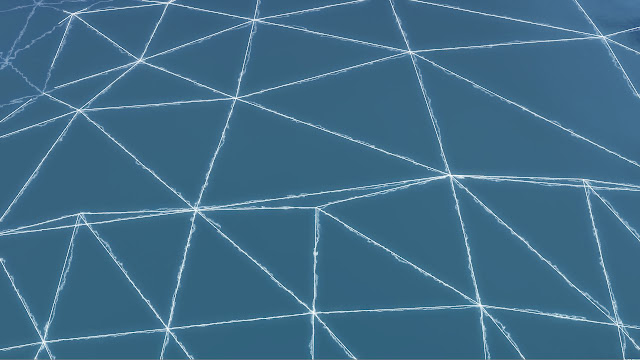
Yesterday I finally came up with a good solution. I'll see if I can explain it in a way that makes sense. The situation that creates seams is the edge between one ring and the next ring with half as many grid squares. As you can see below, where the two rings share an edge, the more detailed ring samples an extra height point between each point on the less detailed ring. This creates a gap in the mesh:
Terrain Rendering

Conceptually, my solution was to force the heights of the extra middle points on the edge of the more detailed grid to be the average of the two points on either side - essentially simulating the edges of the neighboring, less detailed grid. In practice, though, it is a bit more tricky. I couldn't do the averaging in the terrain shader since it only has very local access to one vertex at a time.

Since my height data is passed to the shader in a texture (rather than being baked into the vertices themselves), I was able to create a secondary texture at each level of detail where I pre-set the averaged intermediate points. Then I configured my grid vertex data with an extra piece of data (currently in the otherwise unused 'Z' component of position) - a blend amount between the averaged height texture and the unmodified texture. Edge vertices have this set to 1, while it is zero elsewhere.

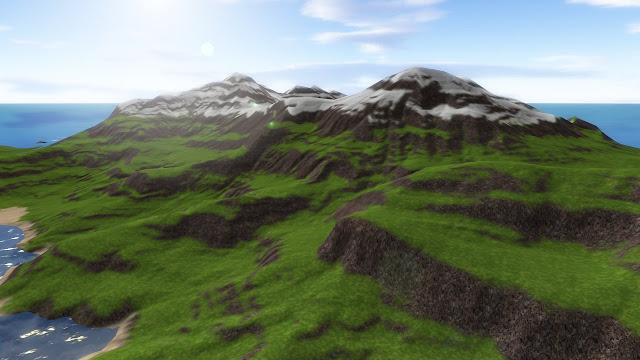
So far it seems to be working really well. Here is the same picture from above, but now using the averaging technique:
Terrain Rendering

Yay - no seams!

Thursday, February 25, 2010

Platform Game - More WIP

Platform Game

A little more progress on my platform game. I've now got background tiles, grass and little wee flowers.

The blurring effect in the background is done in real-time on the GPU. Yay for gratuitous use of shaders!

Friday, February 12, 2010

Tunescape Update

Tunescape

I've managed to avoid my standard behavior and have been pushing to try to actually finish (!!) Tunescape. It is in pretty good shape right now, and I've currently got it in playtest over on Xbox Live Indie Games.

In polishing the game, I've been doing some fun shader work. I implemented a particle system shader for my new explosion effects, and I created a "plasma" shader for the background that uses multi-resolution noise to generate a smoothly moving cloud pattern.

Tunescape

Friday, December 11, 2009

Lots of Fishes...

Lots of Fishes

Just some stuff I'm messing around with...

Tuesday, September 29, 2009

Fractal Rendering on the GPU - Mandelbrot and Julia Sets in an HLSL Shader

Julia Set Shader

I've been playing with HLSL shaders recently, and it occurred to me that the horsepower of the GPU could probably be harnessed to render fractals like the Mandelbrot Set. It turns out to be a perfect task for a shader, since it involves lots of completely localized calculations - exactly what graphics cards are good at.

A bit of web searching turned up the not surprising fact that I'm not the first person to have this realization. I found some nice code examples here and here. My version takes inspiration from both of these approaches, and adds a few tweaks of my own.

The image above is of the Julia set, rendered completely by the GPU. Below is, of course, the Mandelbrot Set.

Mandelbrot Set Shader

And another view of the Mandelbrot set zoomed in a bit:

Mandelbrot Set Shader

On my GeForce 8800GT, I can zoom and pan around at a rock-solid 60 frames per second. Here is a video exploring the Julia set. The warping you see is me transforming the seed used to render the set.


Here is the shader code I ended up with. It is pretty simple. I'm using the Normalized Iteration Count Algorithm to get nicely smoothed coloring. The parameters are set to sensible default values, but you will want to pass them in from your application and map them to some sort of input device. For rendering, simply draw a full screen quad using the shader. In my application I also gild the lily a bit and apply a bloom effect.

int Iterations = 128;
float2 Pan = float2(0.5, 0);
float Zoom = 3;
float Aspect = 1;
float2 JuliaSeed = float2(0.39, -0.2);
float3 ColorScale = float3(4, 5, 6);

float ComputeValue(float2 v, float2 offset)
{
float vxsquare = 0;
float vysquare = 0;

int iteration = 0;
int lastIteration = Iterations;

do
{
vxsquare = v.x * v.x;
vysquare = v.y * v.y;

v = float2(vxsquare - vysquare, v.x * v.y * 2) + offset;

iteration++;

if ((lastIteration == Iterations) && (vxsquare + vysquare) > 4.0)
{
lastIteration = iteration + 1;
}
}
while (iteration < lastIteration);

return (float(iteration) - (log(log(sqrt(vxsquare + vysquare))) / log(2.0))) / float(Iterations);
}

float4 Mandelbrot_PixelShader(float2 texCoord : TEXCOORD0) : COLOR0
{
float2 v = (texCoord - 0.5) * Zoom * float2(1, Aspect) - Pan;

float val = ComputeValue(v, v);

return float4(sin(val * ColorScale.x), sin(val * ColorScale.y), sin(val * ColorScale.z), 1);
}

float4 Julia_PixelShader(float2 texCoord : TEXCOORD0) : COLOR0
{
float2 v = (texCoord - 0.5) * Zoom * float2(1, Aspect) - Pan;

float val = ComputeValue(v, JuliaSeed);

return float4(sin(val * ColorScale.x), sin(val * ColorScale.y), sin(val * ColorScale.z), 1);
}

technique Mandelbrot
{
pass
{
PixelShader = compile ps_3_0 Mandelbrot_PixelShader();
}
}

technique Julia
{
pass
{
PixelShader = compile ps_3_0 Julia_PixelShader();
}
}