Friday, September 2, 2011
Block Zombies: Aerial News Footage of the Infected Zone
Here is a video using the CRT screen effect I mentioned in my last blog post.
I'm planning on using something like this as an intro scene, or perhaps as the backdrop for my game menus.

Tuesday, August 30, 2011
Using shaders to create an old CRT TV screen effect

I've been playing around with adding an effect to make Block Zombies look like it is playing on an old, crappy TV. It still needs tweaking, but it is starting to get close to what I want.
Using a couple of screen-space shaders, I'm blurring, adding scanlines, desaturating and adding darkened corners.
I'm not planning on using this effect in-game, but I'm thinking that the intro will be some sort of news-ticker with footage of the scene of the zombie outbreak.
Friday, August 26, 2011
Block Zombies: Dark and Stormy Gameplay
I've been working on adding darkness, thunder and lightning to Block Zombies.
I used a modified version of the technique I used for Kung Fu FIGHT! - tweaking parameters in my bloom shader to do most of the work. Because Block Zombies is 3D, I also mess with the light direction, which does fun things with the shadows when lightning strikes.
Because the effect is just manipulating lighting and bloom parameters, it is basically cost-free. I haven't added in actual rain yet, since that definitely wouldn't be cost-free, and I'm not sure I can afford the extra overhead.
The glowy zombie eyes, windows and sparks are done by reserving a section of my color palette that my shaders recognize and treat as being self-lit.
Monday, August 22, 2011
Block Zombies
Here is the first work-in-progress gameplay video from Block Zombies - my next game for Xbox LIVE Indie Games.
The core gameplay is mostly done, and I'm now working on adding more variety to the enemies and environments.
I'm hoping to get it out the door in the next month or so.
Thursday, August 4, 2011
Kung Fu FIGHT! now on WP7

I was worried about how it would translate to the phone, but it runs really well - even with the downgrade to 30fps.
I was also concerned about the touch controls, but that ended up not being a problem.
If anything, I think I might prefer the phone version to the Xbox one - it works really well with the "pick up and play for a bit" affordance that the handheld device offers.
If you have a Windows phone, you can grab it here:
Kung Fu FIGHT! for Windows Phone
Saturday, July 16, 2011
Kung Fu FIGHT! on WP7
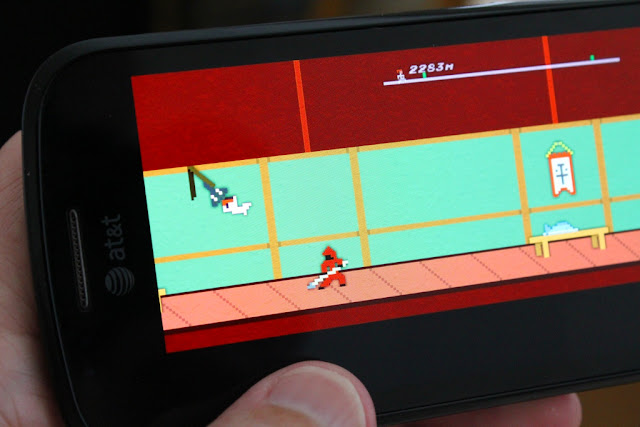
The past few days I've been working on getting Kung Fu FIGHT! working on WP7. When creating the game, I was very careful to keep portability in mind. That has paid off, since it is already mostly done.
I just need to do some more tweaking on the UI and tighten up my touch controls.
Tuesday, July 5, 2011
MapCache - Offline Maps for WP7
Update: MapCache is now available in the Windows Phone Marketplace here: MapCache Offline Maps for WP7


Still, the phone has that nice GPS functionality, and having a map in your pocket can really come in handy sometimes. But how can you have access to a map without a data plan?
The solution - map caching. MapCache is an application that lets you browse around a map while you have a connection, all the while caching the map areas you view for later use offline.
Note that this isn't just useful for people like me without data plans. In can also be useful when:
A while back, I was in Tijuana with a group of people, many of whom had smartphones with data plans. Everyone wanted to use maps on their phones, but the roaming data charge was so expense that it just didn't make sense. A pre-cached map would have solved the problem.


MapCache has most of the features you would expect from a smartphone mapping application. It locates you via GPS, and you can browse around the map or use search tools to find places or businesses. The map tile data comes from openstreetmap.org which, unlike map services from Google or Microsoft, allows you to cache data. Place and local business search are provided by Yahoo! PlaceFinder and Local Search.
The application is pretty much finished. I'm wrapping up a few remaining items on my todo list, and plan to submit it to the WP7 marketplace shortly.
I have a shiny WP7 smartphone, but I don't have a data plan. I just don't need it enough to justify the hefty monthly fee. I like paying the roughly $8 a month that GoPhone service costs me.
Still, the phone has that nice GPS functionality, and having a map in your pocket can really come in handy sometimes. But how can you have access to a map without a data plan?
The solution - map caching. MapCache is an application that lets you browse around a map while you have a connection, all the while caching the map areas you view for later use offline.
Note that this isn't just useful for people like me without data plans. In can also be useful when:
- you have a limited data plan that you want to minimize use of
- you want to avoid prohibitive roaming charges
- you want maps when you are in an area of limited or no coverage
A while back, I was in Tijuana with a group of people, many of whom had smartphones with data plans. Everyone wanted to use maps on their phones, but the roaming data charge was so expense that it just didn't make sense. A pre-cached map would have solved the problem.
MapCache has most of the features you would expect from a smartphone mapping application. It locates you via GPS, and you can browse around the map or use search tools to find places or businesses. The map tile data comes from openstreetmap.org which, unlike map services from Google or Microsoft, allows you to cache data. Place and local business search are provided by Yahoo! PlaceFinder and Local Search.
The application is pretty much finished. I'm wrapping up a few remaining items on my todo list, and plan to submit it to the WP7 marketplace shortly.