Tuesday, April 12, 2011
Kung Fu FIGHT! Brutal Difficulty Gameplay Video
Here is a play through of the first section of Kung Fu FIGHT! on the Brutal difficulty level.
My hand-eye coordination has definitely improved since I started working on this game :-) I almost made it through without dying.

Monday, April 11, 2011
Randomization In Games - Managing Player Expectations
Generating random numbers for use in games is easy. In C#, it is as simple as creating an instance of the Random class and calling Next() on it. Want to decide if an event should occur given a particular probability? Easy, just call Random.Next() and check if the result is less that your probability (expressed as a value from 0 to 1).
The results of this simple approach, however, do not always do a good job of creating behavior that corresponds to a player's expectations. This is because the results are truly random (ok, psuedorandom - but that's generally random enough) and events are independent. By independent, I mean that the result of a probability check does not depend in any interesting way on previous checks. Like flipping a coin, it doesn't matter if you have gotten 9 heads in a row - the probability of getting heads on the next flip is still exactly 50%.
People, however, have a tendency to assume that past result *do* influence future ones. In the case of flipping a coin, this assumption is irrational. In other cases, though, it isn't so much. A key example of this is selecting items randomly from a collection. If you replace items between choosing, then each selection is random and independent of the others. If, however, you do not replace items that you have chosen, this is no longer the case.
The notion of selecting items from a collection without replacement is a very useful one in games, and can result in random behavior that is much more in line with player expectations than independent probability checks.
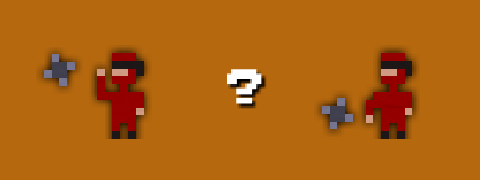
In working on Kung Fu FIGHT!, I ran into this problem a lot. For example, when an enemy throws a shuriken, I have to decide if they should throw high or low. I started with a simple 50% probability check, but this sometimes resulted in a long string of high or low throws in a row. Perfectly reasonable from a probability perspective, but not what I wanted. On the other hand, simply alternating between high and low seemed too regular.
What to do?
I created a simple helper class to allow me to select random values from a finite "bucket". Here is how it works for my shuriken throwing behavior. To initialize the bucket:
Random random = new Random();

RandomBucket<bool> throwBucket = new RandomBucket<bool>(random).Add(true, 2).Add(false, 2);
What this does is initialize a bucket and fill it with two 'trues' and two 'falses'.
Then, to decide to throw high or low, simply do:
if (throwBucket.Choose())
{
  // throw high
}
else
{
  // throw low
}
Each time we call Choose(), a random value is selected from the bucket and take out of the list of available values. When we run out of values, the bucket is refilled with its original contents.
The result of this is random behavior with local dependencies. Each time I select a value, the probability that I get that value again next time goes down. You can't get more than four trues or falses in a row - and even that is fairly unlikely. If we only put 1 true and one false in the bucket instead of two of each, the behavior becomes even more locally dependent. Adding more values in makes things more random.
In addition to having nice properties for game randomness, the RandomBucket class also make for simple, clean code. For example, when I shoot out spark particles for bombs, I use a color bucket to choose what color a spark is:
RandomBucket<Color> colors =
  new RandomBucket<Color>(random).Add(Color.Yellow, 1).Add(Color.Orange, 1).Add(Color.Red, 1);

Color sparkColor = colors.Choose();
Here I am spitting out the colors in equal volumes, but I could easily change the ratios by altering the numbers when seeding the bucket.
Here is the RandomBucket class. As you can see, it is pretty simple. It doesn't generate garbage (an important quality for Xbox development) and it is quite efficient for reasonably small numbers of values, which should be the case since if you use a large number of values you might as well just use true randomness.
using System;
using System.Collections.Generic;

namespace MyCoolNamespace
{
    public class RandomBucket<T>
    {
        List<T> chooseList = new List<T>();
        List<T> discardList = new List<T>();
        Random random;

        public RandomBucket(Random random)
        {
            this.random = random;
        }

        public RandomBucket<T> Add(T value, int number)
        {
            for (int i = 0; i < number; i++)
            {
                chooseList.Add(value);
            }

            return this;
        }

        public T Choose()
        {
            if (chooseList.Count == 0)
            {
                List<T> tmp = chooseList;
                chooseList = discardList;
                discardList = tmp;
            }

            int pos = random.Next(chooseList.Count);

            T obj = chooseList[pos];

            chooseList.RemoveAt(pos);

            discardList.Add(obj);

            return obj;
        }

        public void Clear()
        {
            chooseList.Clear();
            discardList.Clear();
        }
    }
}
Wednesday, April 6, 2011
New Enemy - The Sumo

Continuing my theme of unapologetic mixing of Chinese and Japanese themes, the new enemy in Kung Fu FIGHT! is a sumo dude.
He leaps at you as you approach. Depending on the timing of his jump, you either need to slide underneath him, or jump over him and stomp on his head as you go by.
Definitely a fun addition.
Monday, March 21, 2011
Box Art and Some New Gameplay Variations

Here is my first shot at box art for Kung Fu FIGHT! It still needs work, but it's getting there.
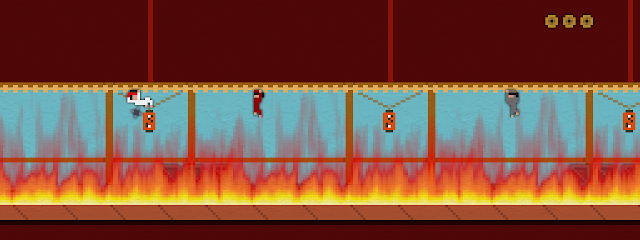
I've been working on adding more content to the game. This past week I added a couple of new gameplay variants.
Traversing the rafters in a burning section of building:
Crate-hopping in a warehouse area:

Wednesday, March 16, 2011
Don't Forget the Instructions

When you are working on a game, it is easy to lose track of the knowledge you have about how your game works - knowledge that may not be obvious to other people.
When playtesting and reviewing XBLIG games, it is amazing how often I find myself in a situation where I am confused about what to do, or miss an important aspect of gameplay. I've also certainly been guilty of putting others in the same situation with my games, but I'm trying to be better about that.
Here are a few thoughts on the subject of game instructions:
- You need instructions! It doesn't matter how simple you think your game is, you need to explicitly tell people how to play otherwise you will lose some of them. A confused player probably won't buy your game.
- Don't assume people will read them. Just because you have instructions squirreled away in your options menu doesn't mean that people will read them. Instructions are boring - people will skip them. Providing gameplay information in the context of the actual gameplay itself is the best way to ensure the player will actually see it. In Kung Fu FIGHT!, I display in-game control hints in the early stages and I also display gameplay tips when the player dies.
- Keep it simple. The best way to get people to read your instructions is to keep things concise and straightforward. Ten pages chock full of instructions will put people off. If your game really is that complicated, try to introduce concepts gradually and explain them when they become relevant.
- Playtest makes perfect. As the person who knows everything there is to know about your game, you are the absolute worst person to judge which aspects of gameplay are obvious and which are not - you need to have other people play it. Kung Fu FIGHT! has been a clear example of this for me. People testing the game got frustrated because they didn't understand that certain actions were possible. The game difficulty level is plenty hard enough without confusion adding to it. Playtest feedback has allowed me to identify confusing situations and ensure that the player gets the information they need.
Thursday, March 10, 2011
Splash Screens and a New Trailer
Games have to have splash screens, so I've been working on that a bit lately. Here they are in a new Kung Fu FIGHT! gameplay trailer.
While still not perfect (30fps is less than ideal), I've been able to coax much better video quality out of youtube. The key is to downsample to 30fps (29.97 to be precise) before uploading and using a downsampling method that blends the frames. The result is a bit blurry, but that is no where near as annoying a choppiness.
Wednesday, March 2, 2011
Playable Credits and a Boss Battle

Kung Fu FIGHT! is shaping up nicely. I've tightened up the gameplay to reduce repetition, eliminated unfair death scenarios, increased the number of trophies to seven and added a boss battle.
I've also added in playable credits. I always credit playtesters in my games, so give me some feedback to get your name in there.
Kung Fu FIGHT! Windows Playtest Build
Kung Fu FIGHT! Playtest on XBLIG App Hub